
Funding a BNB Casino Account, Step by Step
Last updated: June 4, 2026
Depositing BNB at a casino takes two things: selecting the right network and sending to the right address. Do both correctly and your funds confirm on-chain in about a minute and land in your account shortly after. Get the network wrong and the deposit disappears into a chain the casino isn’t watching. This guide covers both ways to deposit — connecting a wallet and sending manually — plus what happens after you hit send, and what to do if a deposit doesn’t show. When you’re ready to fund an account, our list of top BNB casinos is the place to start.
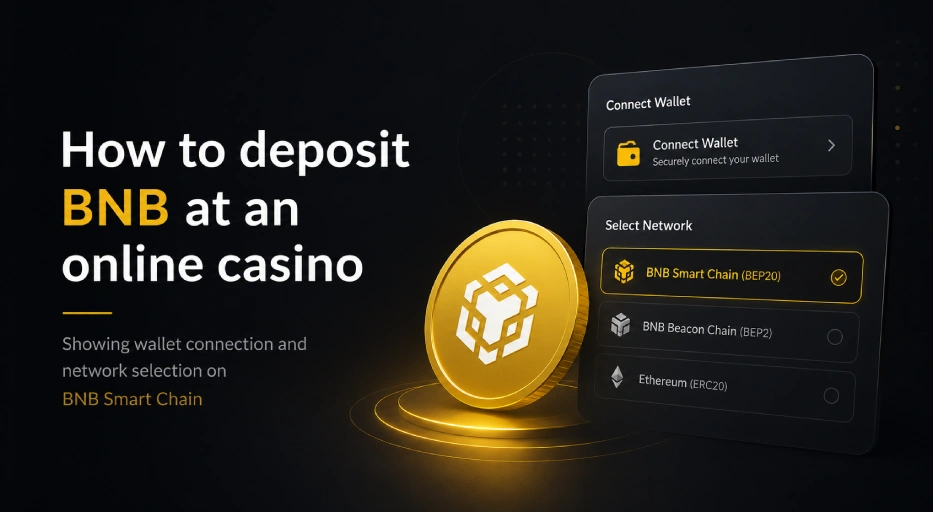
Table of contents
Two Ways to Deposit BNB
There are two routes to fund a BNB casino account, and most platforms support both. The first is connecting your wallet directly — the casino links to MetaMask, Trust Wallet, or another wallet and you approve the deposit inside the wallet. The second is a manual transfer — the casino shows you a deposit address, and you send BNB to it from your wallet like any other transaction.
Neither is better in absolute terms; they suit different habits. Connecting is faster for repeat deposits and feels seamless once set up. Manual transfers give you more control and work everywhere, including on platforms that don’t offer a wallet connection. Both rely on the same underlying network, so confirmation times and fees are identical. This guide assumes you already have a funded wallet — if you don’t, our MetaMask and Trust Wallet guides cover setup and funding first.
Depositing by Connecting Your Wallet
On the casino’s deposit or cashier page, look for a “Connect Wallet” option. Selecting it opens a prompt to link your wallet — via a browser extension on desktop, or WalletConnect (a QR-code pairing) on mobile. Approve the connection in your wallet, and the casino can then request your deposit, which you confirm with a tap or click. The amount leaves your wallet, the transaction broadcasts to BNB Smart Chain, and the casino detects it automatically.
The one rule that matters here: only ever approve a connection on the official casino domain. Phishing sites copy real casinos precisely to capture wallet approvals, so check the URL before you connect. A genuine connection only grants the casino the ability to request transactions you still have to approve — it should never ask for your recovery phrase. If anything requests that phrase, close the page immediately. Our BNB wallet security tips cover what safe approvals look like.
Depositing by Manual Transfer
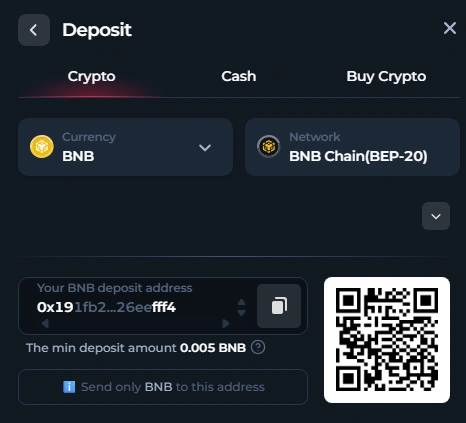
The manual method works at every casino that accepts BNB. On the deposit page, select BNB (or BNB Smart Chain / BEP-20) as the deposit currency, and the casino displays a wallet address, usually with a QR code. Copy that address exactly, or scan the QR code from your wallet’s send screen — scanning removes the risk of mistyping. Enter the amount, double-check the address matches, and confirm the send.
A habit worth keeping every time you use a new deposit address: send a small test amount first — 0.01 BNB is enough — and confirm it credits before sending the rest. On BNB Smart Chain this costs only cents, and it has saved countless players from sending a full balance to a wrong or mis-pasted address. Crypto transactions can’t be reversed, so this small step is the cheapest insurance there is. For a deeper look at the mechanics of what you’re sending, see our guide on how BNB transactions work.
Always Confirm the Network
This is the single most important detail in any BNB deposit. Whether you connect or send manually, the network must be BNB Smart Chain — shown as BSC or BEP-20. Never deposit using the Ethereum network or the older BNB Beacon Chain (BEP-2). If you send on the wrong network, the funds arrive at the address on a chain the casino isn’t monitoring, and they won’t be credited.
A reputable casino labels its deposit network clearly. If a deposit page just says “BNB” with no network specified, contact support and confirm before sending — a platform that’s vague about this detail is telling you something about how carefully it handles the technical side. When withdrawing from an exchange to deposit, the exchange will ask which network to use; select BNB Smart Chain there too. This is the step where the most expensive mistakes happen, so it’s worth slowing down for.
What Happens After You Deposit
Once you send, your transaction is picked up by the network and confirmed within seconds. Most casinos wait for 15 to 20 confirmations before crediting — a safety margin that takes roughly a minute on BNB Smart Chain. After that, the casino’s system detects the deposit and credits your account, usually within another moment or two. From hitting send to a playable balance is typically one to two minutes total.
If it takes a little longer, the delay is almost always the casino’s processing rather than the network, which has already done its part. For how the timing and costs break down at each stage, our guide on BNB transaction speed and fees at casinos goes deeper, and if you’re checking whether a platform’s minimum suits your deposit size, our minimum deposit guide has current figures. Once your balance is funded, withdrawing follows the reverse path, covered in our BNB casino withdrawals guide.
When a Deposit Doesn’t Show Up
If your balance hasn’t updated after a few minutes, don’t panic — start by checking the transaction on a block explorer. Paste your transaction hash into BscScan and look at the status. If it shows “Success,” the funds reached the deposit address and the network did its job; any remaining delay is on the casino’s side, so contact support with the hash and they can locate it. If it shows “Pending,” it’s still processing. If it shows “Failed,” the funds never left your wallet — usually because there wasn’t enough BNB for gas.
The most common real problems are a wrong-network send or a deposit below the casino’s minimum. Our guide on how to check BNB transactions walks through reading the on-chain record, and if a transfer is stuck pending, the stuck transaction guide covers the fixes. For choosing platforms that process deposits cleanly, see our how to choose a BNB casino guide and our casino reviews — BetFury is one example that credits BNB deposits quickly and labels its network clearly. To compare more options, browse the full list of casinos accepting BNB.
Always gamble responsibly. Read our responsible gambling page for practical guidance, and see our advertiser disclosure for affiliate information.
FAQ
- How do I deposit BNB at a casino?
Either connect your wallet through the casino’s “Connect Wallet” option and approve the deposit, or select BNB on the deposit page and send to the address shown from your wallet. Both methods use BNB Smart Chain and credit within a minute or two. - Which network should I use for a BNB deposit?
Always BNB Smart Chain, shown as BSC or BEP-20. Never use Ethereum or BNB Beacon Chain (BEP-2). Sending on the wrong network means the casino can’t see the deposit, so confirm the network before every send. - How long does a BNB casino deposit take?
Typically one to two minutes. The network confirms in about a minute after 15 to 20 confirmations, then the casino credits your account shortly after. Longer delays are usually the casino’s processing, not the network. - Should I connect my wallet or send manually?
Both work. Connecting is faster for repeat deposits; manual sending gives more control and works at every platform. They use the same network, so fees and speed are identical. Choose whichever fits your habits. - Why hasn’t my BNB deposit been credited?
Check the transaction on BscScan with your hash. “Success” means the network delivered it and the delay is the casino’s — contact support with the hash. “Failed” means it never sent, usually due to insufficient gas. A wrong-network send is the other common cause. - Do I need to send a test deposit first?
It’s a smart habit with any new address. Sending 0.01 BNB first confirms the address and network are correct before you move your full balance. It costs only cents on BSC and prevents irreversible mistakes. - Is it safe to connect my wallet to deposit?
Yes, on the official casino site. A legitimate connection only lets the casino request transactions you approve, and never asks for your recovery phrase. The risk is connecting on a phishing site, so always verify the URL first. - Can I deposit BEP-20 tokens instead of BNB?
Often yes — many casinos accept BEP-20 tokens like USDT alongside BNB. Select the specific token on the deposit page and confirm it’s the BNB Smart Chain version. Remember you still need a little BNB in your wallet for the gas fee.

BNB Casino is an independent website reviewing crypto casinos that accept BNB. We are not a gambling operator and do not accept bets or process payments. Some links are affiliate links, meaning we may earn a commission at no extra cost to you. 18+ only. Please gamble responsibly.