
Fixing a Stuck or Pending BNB Transaction
Last updated: June 9, 2026
A stuck BNB transaction is almost always one of two things: a pending transaction sitting in the mempool because gas was set too low, or a failed transaction that never actually left your wallet. Both look alarming, but both are fixable — and in the failed case, your funds never moved. This guide covers how to diagnose a stuck BNB transaction, the specific fix for each cause, and how to clear it in MetaMask and Trust Wallet.
Before anything else, check the transaction status on a block explorer. Everything below assumes you’ve done that, because the fix depends entirely on what the status shows. Our guide on how to check BNB transactions walks through reading the result if you haven’t done it before.
Table of contents
What “Stuck” Actually Means
“Stuck” covers several different situations that need different responses. Getting the diagnosis right first saves time and prevents making the situation worse.
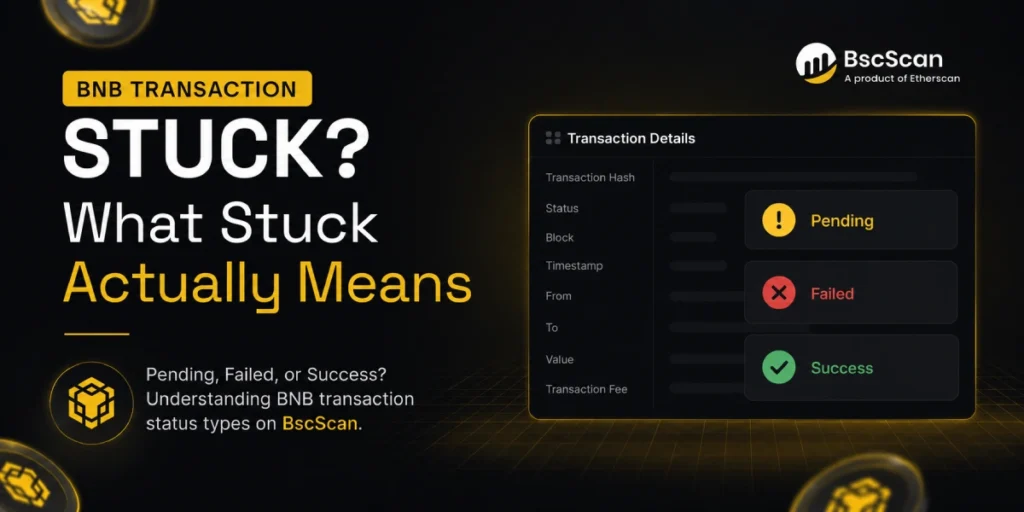
Pending for longer than expected. The transaction was broadcast to the network but hasn’t been confirmed yet. It’s in the mempool — the queue of transactions waiting to be picked up by a validator. This is the fixable stuck state.
Failed. The transaction was processed but didn’t complete. Your funds never left your wallet, though a small amount of gas may have been consumed. This isn’t really stuck — it’s done, and you retry.
Success but not credited. The transaction completed on-chain but the casino hasn’t updated your balance. This isn’t a network issue at all — the blockchain did its job, and the delay is on the platform’s side. This is the most common misdiagnosis.
Checking the status on BscScan tells you immediately which of these you’re dealing with. Each one has a different fix, and they don’t overlap.
Why BNB Transactions Get Stuck
On BNB Smart Chain, genuinely stuck transactions are uncommon — the network is fast and produces a block every 3 seconds. But there are a few real causes worth knowing.
Gas price too low. Validators prioritise transactions by the gas price they pay. If the price you set is below what validators are currently accepting, the transaction sits in the mempool waiting. This is the most common cause of a pending transaction that won’t clear.
Insufficient gas limit. The gas limit is the maximum computational work your transaction is allowed to use. If it’s set too low for the complexity of what you’re doing (particularly for BEP-20 token transfers, which involve a smart contract call), the transaction will fail partway through.
Nonce conflict. Every transaction from a wallet is assigned a sequential number called a nonce. If an earlier transaction is stuck, all subsequent ones from that wallet are blocked too, because the network processes them in order. You can’t skip ahead; the earlier one must be resolved first.
Network congestion. BSC handles congestion better than Ethereum, but under heavy load, gas prices spike temporarily and low-priced transactions slow down. This usually clears quickly without any intervention needed.
Understanding how transactions work at this level ties into how the network processes all your transfers — our guide on how BNB transactions work covers the mechanics in full.
How to Fix a Stuck Transaction in MetaMask
MetaMask gives you two built-in options for a pending transaction: speed it up or cancel it. Both work by replacing the original transaction with a new one using the same nonce but a higher gas price, which incentivises validators to pick it up. Here’s how to use each.
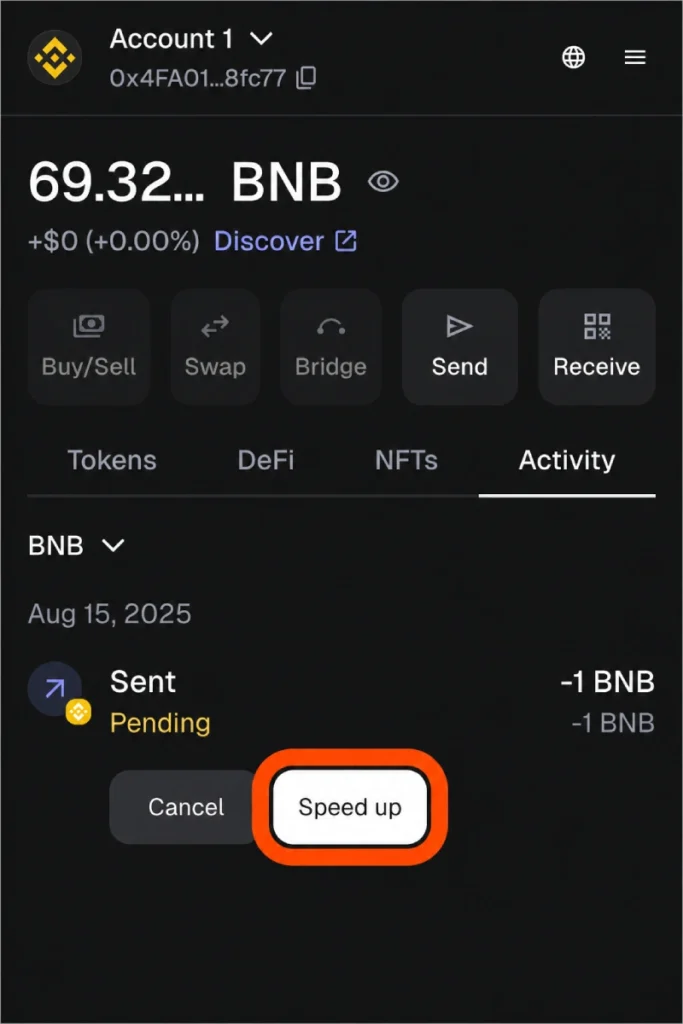
Speed Up. Open MetaMask and find the pending transaction in your activity feed. Click “Speed Up” and MetaMask will suggest a higher gas price. Confirm it. The new transaction competes with the original for the same slot — once one is confirmed, the other is dropped. Use this when you want the original transaction to go through, just faster.
Cancel. If you want to stop the transaction entirely, click “Cancel” instead. This sends a zero-value transaction to yourself with the same nonce and a higher gas price, effectively bumping the original out of the queue. Note: cancellation isn’t guaranteed if the original transaction gets picked up first — it’s a race, not a certainty. If you see “Cancel” is greyed out, the transaction may have already confirmed.
Advanced gas controls. If the built-in buttons aren’t available or you want more control, go to Settings → Advanced in MetaMask and enable “Advanced gas controls.” This lets you manually set the gas price and limit on any transaction, which is useful for preventing stuck transactions rather than just fixing them.
Custom nonce method. If the Speed Up and Cancel buttons aren’t working, you can manually replace the transaction. Enable custom nonce in MetaMask settings, then send a new transaction — to yourself or the original destination — with the same nonce number as the stuck one and a higher gas price. The network will confirm whichever arrives with the better price and drop the other. This is the most reliable manual fix for a persistent stuck transaction.
For the full MetaMask setup context, our MetaMask for BNB guide covers the wallet configuration for BNB Smart Chain from the start.
How to Fix a Stuck Transaction in Trust Wallet
Trust Wallet doesn’t expose the same speed-up and cancel controls as MetaMask. The most practical approach depends on how accessible the transaction’s nonce is.
Wait it out. On BNB Smart Chain, a pending transaction that’s genuinely just slow rather than incorrectly priced will usually clear on its own within minutes. Because BSC blocks arrive every 3 seconds and the network moves quickly, many “stuck” Trust Wallet transactions resolve without intervention if you wait 5 to 10 minutes.
Import to MetaMask. If the transaction is genuinely stuck and Trust Wallet offers no resolution, you can import your wallet into MetaMask using the same recovery phrase. Once in MetaMask, you have access to the speed-up and cancel controls described above and can resolve the nonce conflict from there. Be careful: importing means entering your recovery phrase into a new environment, so only do this in the official MetaMask app and only if you’re confident in the security of the device you’re using. Our BNB wallet security tips cover why this matters.
Contact Trust Wallet support. For transactions stuck in unusual circumstances, Trust Wallet’s support team can sometimes advise on platform-specific options. Their documentation on the Trust Wallet community also covers common transaction issues. For Trust Wallet setup and BNB-specific configuration, our Trust Wallet for BNB guide covers the basics.
What to Do if the Transaction Failed
A failed transaction status on BscScan means the transaction was processed but didn’t complete. Your funds never moved — they’re still in your wallet. The gas paid for the failed attempt is gone (usually a tiny amount), but the main balance is safe.
The most common cause is insufficient gas. The transaction used up the gas limit you set before finishing the work, and the network rolled back the changes. There’s no damage done; you just retry.
Before retrying, check two things. First, confirm you have enough BNB to cover both the amount you’re sending and the gas fee — they come from the same wallet balance. Second, check that the gas limit is set appropriately for the type of transaction. A simple BNB transfer can use a low gas limit; a BEP-20 token transfer involving a smart contract needs more. In MetaMask, the suggested gas estimates are usually correct — only override them if you know what you’re doing.
Once those are checked, send the transaction again. The failed one is gone from the queue and doesn’t affect the new attempt.
When the Casino Is the Cause, Not the Network
This is worth its own section because it’s where most confusion happens. If BscScan shows your transaction as “Success” with the casino’s correct receiving address, the network delivered your funds. A deposit that hasn’t credited, or a withdrawal that appears not to have arrived, is a casino-processing issue at that point — not a stuck transaction.
For deposits: wait a few minutes after the on-chain confirmation, then contact support with the transaction hash. A Success status is strong evidence the funds arrived and the platform needs to credit them. For withdrawals showing Success: your funds are in your wallet — try refreshing the wallet app or re-adding the token if it’s a BEP-20 asset that isn’t displaying.
Casino-side delays have different causes from network issues, and different fixes. Our guide on why BNB withdrawals get delayed covers every casino-side cause in detail, and BNB casino deposits explains the full deposit flow including what happens after the on-chain confirmation.
How to Prevent Stuck Transactions
Most stuck transactions are avoidable. A few consistent habits eliminate the most common causes entirely.
Always keep a BNB gas reserve. Every transaction on BNB Smart Chain requires BNB for gas, regardless of which token you’re sending. Running your BNB balance to zero means no transactions can go through until you top it up. Keep at least 0.01 BNB in your wallet at all times — it covers dozens of normal transactions and costs very little to maintain.
Use suggested gas estimates. Wallets like MetaMask calculate a suggested gas price based on current network conditions. Accepting the suggestion is almost always correct. Only manually lowering the gas price makes sense on an extremely quiet network, and the risk — a stuck transaction — isn’t worth the tiny saving on a few cents.
Send a test transaction first. For any new address or casino deposit, send a small amount first and confirm it arrives before sending the full transfer. This checks the address, the network selection, and the gas handling in one cheap step. On BNB Smart Chain a test transaction costs only cents. Our guide on BNB casino deposits covers this habit in full context.
Confirm the network before every send. Sending BNB on the wrong network — Ethereum instead of BNB Smart Chain, for example — won’t produce a stuck transaction on BSC, but the funds will land on the wrong chain, which is harder to fix than a stuck pending state. Always confirm the network is BNB Smart Chain before sending to a casino or any new address.
Don’t spam transactions. Sending multiple transactions in quick succession can create nonce issues, where later transactions are blocked by an earlier one still processing. If you need to send several transfers, wait for each to confirm before sending the next.
Following these habits consistently means a stuck BNB transaction stays a rare event rather than a regular problem. For choosing platforms that handle the casino side of transactions reliably, start with our top BNB casinos and check our how to choose a BNB casino guide for what to look for.
Always gamble responsibly. Read our responsible gambling page for practical guidance, and see our advertiser disclosure for affiliate information.
FAQ
- Why is my BNB transaction stuck as pending?
Usually because the gas price was set too low and validators haven’t picked it up yet. On BNB Smart Chain this clears faster than on other chains, but a very low gas price can leave a transaction sitting in the mempool. Speed it up in MetaMask or wait if it’s been less than a few minutes. - How do I fix a stuck BNB transaction in MetaMask?
Use the “Speed Up” button on the pending transaction to resubmit it at a higher gas price. If you want to cancel it, use the “Cancel” button instead. Both replace the original transaction using the same nonce. If those buttons aren’t available, enable custom nonce in settings and manually send a new transaction with the same nonce and a higher gas price. - Will my funds be lost if a transaction is stuck?
No. A pending transaction hasn’t been confirmed, so your funds are still in your wallet — they’re just in a waiting state. A failed transaction means funds never left at all. The only scenario where funds are genuinely at risk is if you sent to the wrong address or wrong network, which is a different problem. - What does a failed BNB transaction mean?
The transaction was processed by the network but couldn’t complete, usually because the gas limit was too low. Your funds stay in your wallet; only the gas used in the attempt is consumed. Check your BNB balance and gas settings, then retry. - My transaction shows “Success” but the casino hasn’t credited me. Is it stuck?
No — a Success status means the network delivered the funds to the casino’s address. The delay is the casino’s processing system, not the blockchain. Contact support with the transaction hash and they can locate and credit the deposit. - How do I cancel a stuck BNB transaction?
In MetaMask, click “Cancel” on the pending transaction to send a replacement zero-value transaction with a higher gas price and the same nonce. This races against the original — whichever gets picked up first is confirmed, the other is dropped. It’s not guaranteed if the original is already being processed. - Can I fix a stuck transaction in Trust Wallet?
Trust Wallet has limited built-in controls for this. Waiting a few minutes often resolves it on BSC. For a genuinely stuck transaction, importing your wallet into MetaMask using the same recovery phrase gives you access to the speed-up and cancel controls. Only do this on a secure, trusted device. - How do I stop BNB transactions from getting stuck?
Keep a BNB gas reserve of at least 0.01 BNB, accept the wallet’s suggested gas price rather than lowering it manually, send a small test first with new addresses, and wait for each transaction to confirm before sending the next. These habits eliminate the most common causes.

BNB Casino is an independent website reviewing crypto casinos that accept BNB. We are not a gambling operator and do not accept bets or process payments. Some links are affiliate links, meaning we may earn a commission at no extra cost to you. 18+ only. Please gamble responsibly.