
Tracking a BNB Transaction Using BscScan
Last updated: June 8, 2026
When a casino deposit hasn’t shown up or a withdrawal feels slow, you don’t have to guess what’s happening — every BNB transaction is publicly visible on BscScan, the block explorer for BNB Smart Chain. Paste in your transaction hash and you can see whether it succeeded, how many confirmations it has, and exactly where the funds went, in about thirty seconds. Knowing how to read that page turns a stressful “where’s my money” moment into a quick check, and tells you whether the holdup is the network or the casino. This guide walks through it step by step so you’re never left wondering after using the best BNB casinos.
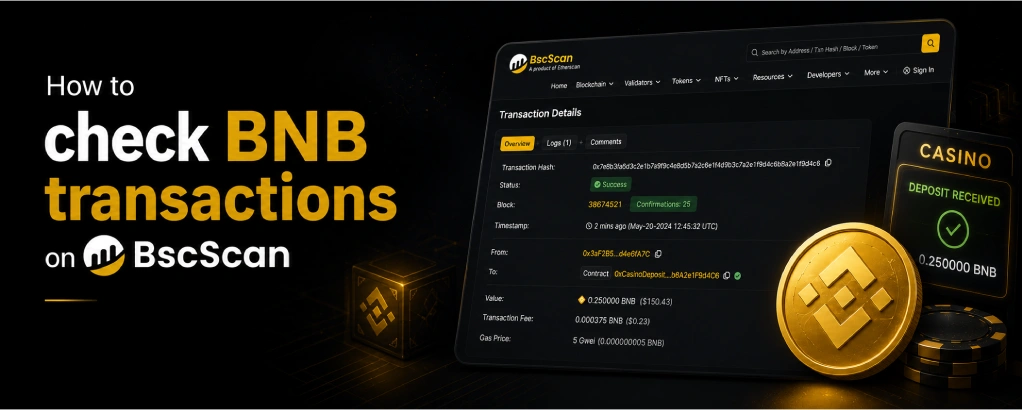
Table of contents
What Is BscScan?
BscScan is a block explorer — a public website that shows every transaction, address, and block on BNB Smart Chain. Because the blockchain is open, anyone can look up any transaction without logging in or owning the wallet. It’s the official, neutral record of what actually happened on-chain, which is exactly why it’s the first place to look when a casino transfer is in question.
You’ll find it at bscscan.com. There’s nothing to install and no account required for basic lookups. Think of it as the receipt system for the entire network: every transfer leaves a permanent, verifiable entry that you can pull up at any time. For the background on what these transactions are and how the network records them, our guide on how BNB transactions work covers the mechanics; this page is about reading the record after the fact.
Finding Your Transaction Hash
To look up a transaction you need its hash — a long string starting with 0x that uniquely identifies it. Your wallet records this for every transaction you make. In MetaMask, open the activity tab and select the transaction to find a link to view it on the explorer. In Trust Wallet, tap the transaction in your history for the same. Exchanges show it in your withdrawal history, and casinos often display it once a withdrawal is processed.
If you can’t find a hash, you can also search BscScan by your wallet address to see all transactions associated with it — useful when you’re not sure a transaction was even created. The hash is the precise way to find one specific transfer, while the address view shows your whole history. Either gets you to the same information; the hash is just faster when you have it.
How to Look Up a Transaction
The lookup itself takes seconds. Go to bscscan.com, paste your transaction hash into the search bar at the top, and press enter. The transaction’s dedicated page loads, showing its full status and details. If you’re searching by wallet address instead, paste the address and you’ll see a list of transactions — find the one you’re looking for by time and amount, and click it to open the same detailed view.
One safety note worth repeating: looking up a transaction or address on BscScan is completely safe and reveals nothing private — it’s public data. But never enter your wallet’s recovery phrase or private key anywhere, including any site claiming to “check” or “validate” a transaction for you. BscScan only ever needs a hash or a public address, never a secret. Our BNB wallet security tips cover this distinction in full.
Reading the Transaction Page
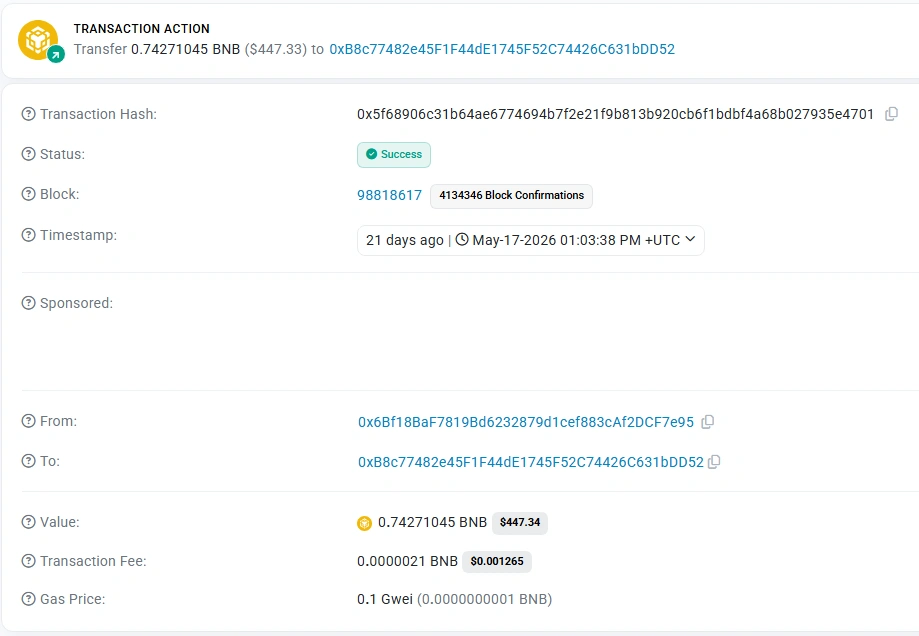
The transaction page packs a lot in, but only a few fields matter for casino troubleshooting. The status tells you whether it succeeded. The block confirmations number shows how many blocks have been built on top of yours — the higher it is, the more final the transaction. The from and to fields show the sending and receiving addresses, letting you confirm the funds went where you intended. The value is the amount sent, and the transaction fee shows the gas you paid.
The timestamp tells you exactly when it was processed. For a casino deposit, the two fields you care about most are the status and the to address: confirm the status is successful and that the receiving address matches the one the casino gave you. If both check out, the network has done its job and the funds reached the casino’s address, regardless of whether your account balance has updated yet.
What Each Status Means
BscScan shows one of three states, and each tells you something different. Success means the transaction completed and is recorded on-chain — the funds left your wallet and arrived at the destination address. If a casino hasn’t credited a successful deposit, the issue is on their side, not the network’s. Pending means the transaction is still being processed and hasn’t been confirmed yet; on BSC this usually clears within seconds, so a long pending state points to a gas or congestion issue.
Failed means the transaction did not go through — the funds never left your wallet, though a small amount of gas may have been consumed in the attempt. The most common cause of a failed transaction is insufficient BNB for gas. Knowing which of these three you’re looking at immediately tells you what to do next: chase the casino on a success, wait or troubleshoot on a pending, or retry with enough gas on a failure. If a transaction is stuck pending for an unusually long time, our guide on what to do when a BNB transaction is stuck covers the fixes.
Using BscScan to Resolve a Casino Issue
Here’s how the explorer turns a frustrating situation into a solvable one. If a deposit hasn’t credited, look up the hash: a “Success” status with the correct casino address proves the funds arrived, which is exactly the evidence support needs. Contact the casino with the transaction hash and they can locate and credit it. If the status is “Failed,” you know the funds never left and there’s nothing for the casino to find — you simply retry with enough gas.
The same approach works for withdrawals. If the casino says a payout was sent and gives you a hash, BscScan confirms whether it’s on its way to your wallet. If there’s no hash yet, the withdrawal is still in the casino’s processing queue and the network isn’t involved — a distinction our guides on BNB casino withdrawals and why BNB withdrawals get delayed explore further. Being able to point to the on-chain record makes support conversations faster and clearer for everyone. For checking deposits specifically, our BNB casino deposits guide walks through the flow, and you can compare platforms on the full list of casinos accepting BNB.
Always gamble responsibly. Read our responsible gambling page for practical guidance, and see our advertiser disclosure for affiliate information.
FAQ
- What is BscScan?
BscScan is the block explorer for BNB Smart Chain — a public website at bscscan.com that shows every transaction, address, and block on the network. You can look up any transaction without an account, making it the neutral record for checking a casino deposit or withdrawal. - How do I find my transaction hash?
Your wallet records it for every transaction. In MetaMask or Trust Wallet, open your transaction history and select the transfer to find a link to view it on the explorer. Exchanges and casinos also display the hash in their withdrawal histories. - What does a “Success” status mean for my deposit?
It means the transaction completed and the funds reached the destination address on-chain. If your casino balance hasn’t updated despite a Success status, the delay is on the casino’s side — contact support with the hash as proof. - What does a “Failed” transaction mean?
The transaction didn’t go through and the funds never left your wallet, though a little gas may have been used. The usual cause is insufficient BNB for gas. Make sure you have enough BNB to cover the fee, then retry. - Is it safe to look up my transaction on BscScan?
Completely. Transaction and address data are public, and looking them up reveals nothing private. Just never enter your recovery phrase or private key anywhere — BscScan only ever needs a public hash or address, never a secret. - Can I check a transaction without the hash?
Yes. Search BscScan by your wallet address to see all transactions linked to it, then find the one you want by time and amount. The hash is faster when you have it, but the address view works when you don’t. - How many confirmations does a BNB transaction need?
The network confirms in seconds, but most casinos wait for 15 to 20 confirmations before crediting — about a minute on BSC. The confirmations count on BscScan shows how many blocks have been built on top of yours. - What should I send casino support if a deposit is missing?
Send them the transaction hash. A hash showing Success with the casino’s receiving address is clear proof the funds arrived, letting support locate and credit the deposit quickly. It’s the single most useful piece of information in any deposit dispute.

BNB Casino is an independent website reviewing crypto casinos that accept BNB. We are not a gambling operator and do not accept bets or process payments. Some links are affiliate links, meaning we may earn a commission at no extra cost to you. 18+ only. Please gamble responsibly.