
Adding BNB Smart Chain to MetaMask
Last updated: June 3, 2026
MetaMask works perfectly well with BNB — it just doesn’t out of the box, because it was built for Ethereum. The one thing you have to do is add BNB Smart Chain as a custom network, a two-minute job you do once. After that, MetaMask handles BNB and BEP-20 tokens exactly like it handles ETH, and connects to almost every BNB casino on the market. This guide covers the full setup and the exact network settings, then walks through funding the wallet and connecting it to play at the best BNB casinos.
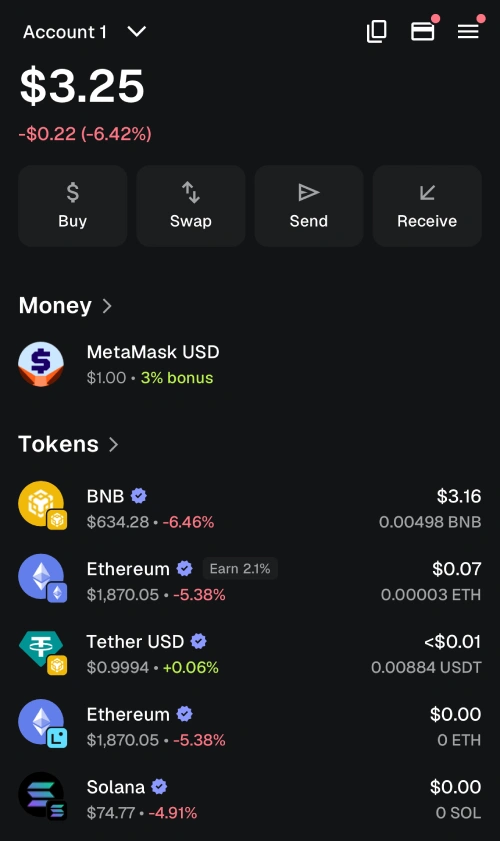
Table of contents
Step 1: Install MetaMask
Install MetaMask only from the official source — metamask.io, or the official extension listing for your browser. Fake MetaMask extensions and apps exist specifically to steal funds, so don’t install from a search ad or a link someone sent you. MetaMask is available as a browser extension for Chrome, Firefox, Brave, and Edge, and as a mobile app for iOS and Android. For desktop gambling, the browser extension is the smoother option.
During setup you’ll create a wallet and be shown a secret recovery phrase — 12 words. Write it down on paper and store it somewhere safe and offline. Never screenshot it, never type it into any website, and never share it with anyone. That phrase is the master key to your funds; anyone who has it can drain your wallet, and no one can recover it for you if you lose it. This is the single most important habit in self-custody. Our BNB wallet security tips cover the rest of the basics worth getting right from day one.
Step 2: Add BNB Smart Chain
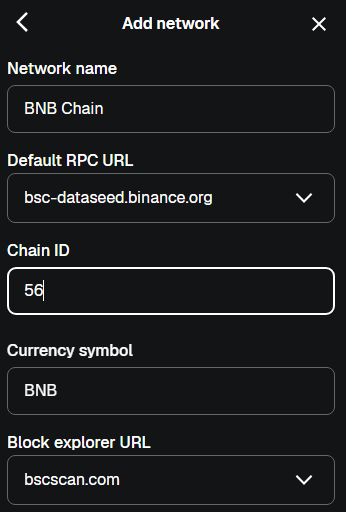
By default MetaMask only shows Ethereum. To use BNB, you add BNB Smart Chain as a custom network. Open the network dropdown at the top of MetaMask, choose “Add network,” then “Add a network manually,” and enter these exact details:
- Network Name: BNB Chain
- New RPC URL: https://bsc-dataseed.binance.org/
- Chain ID: 56
- Currency Symbol: BNB
- Block Explorer URL: https://bscscan.com
Save it, and BNB Smart Chain appears in your network list. Switching between Ethereum and BSC is now a single click from the same dropdown. The Chain ID of 56 is the detail that matters most — if you mistype it, the network won’t work, so double-check that field. If you want to understand what this network actually is and why it’s separate from Ethereum, our guide to what BNB Smart Chain is explains the background.
Step 3: Fund Your Wallet With BNB
With BSC selected in MetaMask, copy your wallet address from the top of the interface. Then buy BNB on an exchange like Binance, Coinbase, or Kraken, and withdraw it to that address. When the exchange asks which network to use for the withdrawal, select BNB Smart Chain (also shown as BSC or BEP-20) — never Ethereum or BNB Beacon Chain. Sending on the wrong network is the most common way funds go missing.
Send a small test amount first — 0.01 BNB is plenty — and confirm it lands in MetaMask before sending the rest. Buy a little more BNB than you plan to deposit at a casino, because every transaction on BSC needs a small amount of BNB for gas. If your balance hits zero, you won’t be able to send anything until you top it up. The full transfer process is covered in our guide on making a BNB casino deposit.
Step 4: Connect MetaMask to a BNB Casino
There are two ways to use MetaMask at a casino. The first is a direct wallet connection: many BNB platforms have a “Connect Wallet” button that triggers MetaMask to ask for permission to link. Approve it, and the casino can see your address and request transactions you then confirm in MetaMask. The second is manual — you simply copy the casino’s deposit address and send BNB to it from MetaMask, like any other transfer.
Connecting is faster for repeat play; manual sending gives you more control and works everywhere. When you connect, only ever approve connections on the official casino domain — check the URL carefully, since phishing sites mimic real casinos to capture wallet approvals. Our guide on how to start playing with BNB walks through the setup process and your available payment options step by step.
Step 5: Deposit and Withdraw
To deposit, make sure BNB Smart Chain is the selected network in MetaMask, then send BNB to the casino’s deposit address or approve the deposit through a wallet connection. The transaction confirms on-chain in about a minute, and most casinos credit the balance shortly after. To withdraw, enter your MetaMask address on the casino’s withdrawal page, select BNB Smart Chain as the network, and confirm — the funds arrive back in your wallet once the casino processes the payout.
One habit worth keeping: withdraw to MetaMask when you finish a session rather than leaving funds on the casino. On BSC the fee is only cents, so there’s no reason to leave a balance exposed to platform risk. Our guides on BNB casino deposits and the wider how to start playing with BNB walkthrough cover the full deposit-to-withdrawal loop if you’re new to it.
Troubleshooting Common Issues
Most MetaMask problems with BNB come down to a handful of causes. If your BNB balance doesn’t show, you’re probably viewing the wrong network — switch the dropdown to BNB Smart Chain. If a transaction won’t send, you likely don’t have enough BNB to cover gas, even if you have other tokens. If a casino won’t connect, confirm you’re on the correct network and the official site URL.
If a transaction is stuck pending, it’s usually a gas issue or temporary network congestion, and it normally resolves or can be cleared by speeding it up in MetaMask. Our guide on what to do when a BNB transaction is stuck covers the fixes. For choosing where to actually play once your wallet is ready, see our how to choose a BNB casino guide and our casino reviews — Rainbet is one platform that pairs smoothly with MetaMask. You can also browse the full list of casinos accepting BNB to compare your options.
Always gamble responsibly. Read our responsible gambling page for practical guidance, and see our advertiser disclosure for affiliate information.
FAQ
- Does MetaMask support BNB?
Yes, once you add BNB Smart Chain as a custom network. MetaMask ships with only Ethereum enabled, but adding BSC takes about two minutes and is a one-time setup. After that it handles BNB and BEP-20 tokens normally. - What are the BNB Smart Chain settings for MetaMask?
Network Name: BNB Smart Chain; RPC URL: https://bsc-dataseed.binance.org/; Chain ID: 56; Currency Symbol: BNB; Block Explorer: https://bscscan.com. The Chain ID of 56 is the critical field — mistyping it stops the network from working. - Why isn’t my BNB showing in MetaMask?
Almost always because the wrong network is selected. Open the network dropdown and switch to BNB Smart Chain. If the balance still doesn’t appear, confirm the transaction succeeded on BscScan using your transaction hash. - Can I use MetaMask on mobile for BNB casinos?
Yes. The MetaMask mobile app supports BSC the same way the extension does, and connects to casinos via its built-in browser or WalletConnect. Many players use the extension on desktop and the app on mobile. - Do I need BNB for gas in MetaMask?
Yes. Every transaction on BNB Smart Chain is paid for in BNB, including transfers of BEP-20 tokens like USDT. Keep a small BNB balance — around 0.01 is enough — so you can always cover fees. - Is it safe to connect MetaMask to a casino?
Yes, provided you only connect on the official casino domain and review what you’re approving. The risk is phishing sites that mimic real casinos. Check the URL before approving any connection, and disconnect when you’re done if you prefer. - What if I sent BNB to MetaMask on the wrong network?
The funds land at your address on the wrong chain, where MetaMask may not display them under BSC. Recovery sometimes involves adding the other network or contacting the sending exchange. Sending a small test first every time prevents this. - Can MetaMask hold both BNB and Ethereum?
Yes. The same MetaMask wallet handles multiple networks. Your address is the same across them, but balances are network-specific — switch the dropdown to see your BNB on BSC or your ETH on Ethereum.

BNB Casino is an independent website reviewing crypto casinos that accept BNB. We are not a gambling operator and do not accept bets or process payments. Some links are affiliate links, meaning we may earn a commission at no extra cost to you. 18+ only. Please gamble responsibly.